采用Java自带的Image IO
废话不多说,上菜
1. 文字水印
1 import sun.font.FontDesignMetrics; 2 3 import javax.imageio.ImageIO; 4 import java.awt.*; 5 import java.awt.image.BufferedImage; 6 import java.io.File; 7 import java.io.FileOutputStream; 8 import java.io.IOException; 9 10 /**11 * @Author ChengJianSheng12 * @Date 2021/6/1013 */14 public class WatermarkUtil {15 16 public static void main(String[] args) throws IOException {17 addText("F:/1.jpeg", "我的梦想是成为火影");18 }19 20 /**21 * 加文字水印22 * @param srcPath 原文件路径23 * @param content 文字内容24 * @throws IOException25 */26 public static void addText(String srcPath, String content) throws IOException {27 // 读取原图片信息28 BufferedImage srcImage = ImageIO.read(new File(srcPath));29 int width = srcImage.getWidth();30 int height = srcImage.getHeight();31 32 // 创建画笔,设置绘图区域33 BufferedImage bufferedImage = new BufferedImage(width, height, BufferedImage.TYPE_INT_RGB);34 Graphics2D g = bufferedImage.createGraphics();35 g.drawImage(srcImage, 0, 0, width, height, null);36 // g.drawImage(srcImage.getScaledInstance(width, height, Image.SCALE_SMOOTH), 0, 0, null);37 38 g.setFont(new Font("宋体", Font.PLAIN, 32));39 g.setColor(Color.RED);40 41 // 计算文字长度42 int len = g.getFontMetrics(g.getFont()).charsWidth(content.toCharArray(), 0, content.length());43 FontDesignMetrics metrics = FontDesignMetrics.getMetrics(g.getFont());44 int len2 = metrics.stringWidth(content);45 System.out.println(len);46 System.out.println(len2);47 48 // 计算文字坐标49 int x = width - len - 10;50 int y = height - 20;51 // int x = width - 2 * len;52 // int y = height - 1 * len;53 54 g.drawString(content, x, y);55 56 g.dispose();57 58 // 输出文件59 FileOutputStream fos = new FileOutputStream("F:/2.png");60 ImageIO.write(bufferedImage, "png", fos);61 fos.flush();62 fos.close();63 }64 65 }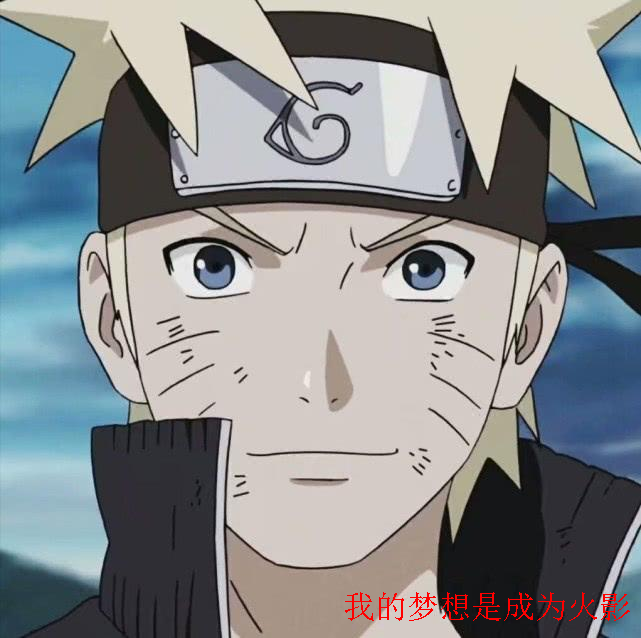
可以设置文字透明度
g.setComposite(AlphaComposite.getInstance(AlphaComposite.SRC_ATOP, 0.8f));
2. 旋转文字
1 import sun.font.FontDesignMetrics; 2 3 import javax.imageio.ImageIO; 4 import java.awt.*; 5 import java.awt.geom.AffineTransform; 6 import java.awt.image.BufferedImage; 7 import java.io.File; 8 import java.io.FileOutputStream; 9 import java.io.IOException;10 11 /**12 * @Author ChengJianSheng13 * @Date 2021/6/1014 */15 public class WatermarkUtil {16 17 // 水印透明度18 private static final float alpha = 0.5f;19 // 水印文字字体20 private static final Font font = new Font("宋体", Font.BOLD, 30);21 // 水印文字颜色22 private static final Color color = Color.RED;23 24 25 public static void main(String[] args) throws IOException {26 addText("F:/1.jpeg", "图片由木叶村提供,仅供忍者联军使用!");27 }28 29 /**30 * 加文字水印31 * @param srcPath 原文件路径32 * @param content 文字内容33 * @throws IOException34 */35 public static void addText(String srcPath, String content) throws IOException {36 // 读取原图片信息37 BufferedImage srcImage = ImageIO.read(new File(srcPath));38 int width = srcImage.getWidth();39 int height = srcImage.getHeight();40 41 // 创建画笔,设置绘图区域42 BufferedImage bufferedImage = new BufferedImage(width, height, BufferedImage.TYPE_INT_RGB);43 Graphics2D g = bufferedImage.createGraphics();44 g.drawImage(srcImage, 0, 0, width, height, null);45 // g.drawImage(srcImage.getScaledInstance(width, height, Image.SCALE_SMOOTH), 0, 0, null);46 47 // 旋转文字48 AffineTransform affineTransform = g.getTransform();49 affineTransform.rotate(Math.toRadians(-30), 0, 0);50 Font rotatedFont = font.deriveFont(affineTransform);51 52 g.setFont(rotatedFont); // 字体53 g.setColor(color); // 颜色54 g.setComposite(AlphaComposite.getInstance(AlphaComposite.SRC_ATOP, alpha)); // 透明度55 56 // 计算文字长度57 int len = g.getFontMetrics(g.getFont()).charsWidth(content.toCharArray(), 0, content.length());58 FontDesignMetrics metrics = FontDesignMetrics.getMetrics(g.getFont());59 int len2 = metrics.stringWidth(content);60 System.out.println(len);61 System.out.println(len2);62 63 // 计算水印文字坐标64 int x = width/5;65 int y = height/3*2;66 67 g.drawString(content, x, y);68 69 g.dispose();70 71 // 输出文件72 FileOutputStream fos = new FileOutputStream("F:/2.png");73 ImageIO.write(bufferedImage, "png", fos);74 fos.flush();75 fos.close();76 }77 78 }
画矩形框
1 import sun.font.FontDesignMetrics; 2 3 import javax.imageio.ImageIO; 4 import java.awt.*; 5 import java.awt.image.BufferedImage; 6 import java.io.File; 7 import java.io.FileOutputStream; 8 import java.io.IOException; 9 10 /**11 * @Author ChengJianSheng12 * @Date 2021/6/1013 */14 public class WatermarkUtil {15 16 // 水印透明度17 private static final float alpha = 0.5f;18 // 水印文字字体19 private static final Font font = new Font("宋体", Font.BOLD, 30);20 // 水印文字颜色21 private static final Color color = Color.RED;22 23 24 public static void main(String[] args) throws IOException {25 addText("F:/1.jpeg", "图片由木叶村提供,仅供忍者联军使用!");26 }27 28 /**29 * 加文字水印30 * @param srcPath 原文件路径31 * @param content 文字内容32 * @throws IOException33 */34 public static void addText(String srcPath, String content) throws IOException {35 // 读取原图片信息36 BufferedImage srcImage = ImageIO.read(new File(srcPath));37 int width = srcImage.getWidth();38 int height = srcImage.getHeight();39 40 // 创建画笔,设置绘图区域41 BufferedImage bufferedImage = new BufferedImage(width, height, BufferedImage.TYPE_INT_RGB);42 Graphics2D g = bufferedImage.createGraphics();43 g.drawImage(srcImage, 0, 0, width, height, null);44 45 g.setFont(font); // 字体46 g.setColor(color); // 颜色47 g.setComposite(AlphaComposite.getInstance(AlphaComposite.SRC_ATOP, alpha)); // 透明度48 49 // 计算文字宽高度50 FontDesignMetrics metrics = FontDesignMetrics.getMetrics(font);51 int textWidth = metrics.stringWidth(content); // 文字宽度52 int textHeight = metrics.getHeight(); // 文字高度53 54 // 计算文字坐标55 int x = (width - textWidth) / 2;56 int y = (height + textHeight) / 2;57 // 写文字58 g.drawString(content, x, y);59 60 // 画矩形61 int padding = 10; // 内边距62 g.drawRect(x - padding/2, y - textHeight, textWidth + padding, textHeight + padding);63 64 g.dispose();65 66 // 输出文件67 FileOutputStream fos = new FileOutputStream("F:/2.png");68 ImageIO.write(bufferedImage, "png", fos);69 fos.flush();70 fos.close();71 }72 73 }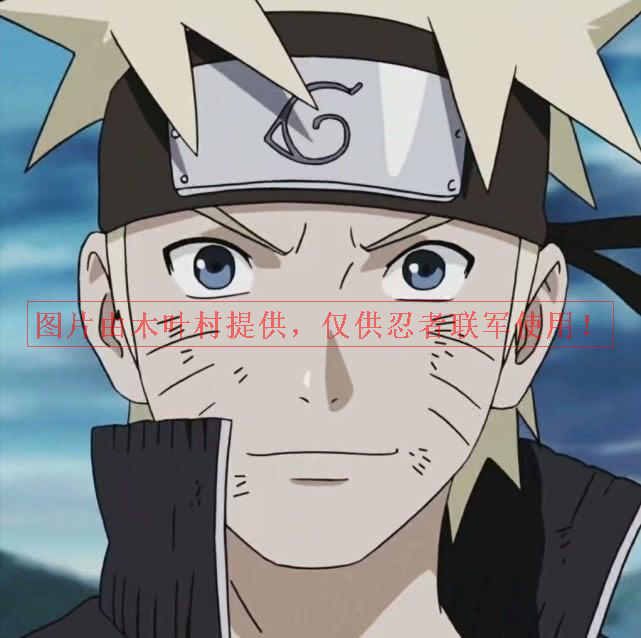
3. 旋转坐标轴
1 import sun.font.FontDesignMetrics; 2 3 import javax.imageio.ImageIO; 4 import java.awt.*; 5 import java.awt.image.BufferedImage; 6 import java.io.File; 7 import java.io.FileOutputStream; 8 import java.io.IOException; 9 10 /**11 * @Author ChengJianSheng12 * @Date 2021/6/1013 */14 public class WatermarkUtil {15 16 // 水印透明度17 private static final float alpha = 0.5f;18 // 水印文字字体19 private static final Font font = new Font("宋体", Font.BOLD, 30);20 // 水印文字颜色21 private static final Color color = Color.RED;22 23 24 public static void main(String[] args) throws IOException {25 addText("F:/1.jpeg", "图片由木叶村提供,仅供忍者联军使用!");26 }27 28 /**29 * 加文字水印30 * @param srcPath 原文件路径31 * @param content 文字内容32 * @throws IOException33 */34 public static void addText(String srcPath, String content) throws IOException {35 // 读取原图片信息36 BufferedImage srcImage = ImageIO.read(new File(srcPath));37 int width = srcImage.getWidth();38 int height = srcImage.getHeight();39 40 // 创建画笔,设置绘图区域41 BufferedImage bufferedImage = new BufferedImage(width, height, BufferedImage.TYPE_INT_RGB);42 Graphics2D g = bufferedImage.createGraphics();43 g.drawImage(srcImage, 0, 0, width, height, null);44 45 g.setFont(font); // 字体46 g.setColor(color); // 颜色47 g.setComposite(AlphaComposite.getInstance(AlphaComposite.SRC_ATOP, alpha)); // 透明度48 49 // 计算文字宽高度50 FontDesignMetrics metrics = FontDesignMetrics.getMetrics(font);51 int textWidth = metrics.stringWidth(content); // 文字宽度52 int textHeight = metrics.getHeight(); // 文字高度53 54 // 旋转坐标轴55 g.translate(-width/5, height/4);56 g.rotate(-30*Math.PI/180);57 58 // 计算文字坐标59 int x = (width - textWidth) / 2;60 int y = (height + textHeight) / 2;61 // 写文字62 g.drawString(content, x, y);63 64 // 画矩形65 int padding = 10; // 内边距66 g.drawRect(x - padding/2, y - textHeight, textWidth + padding, textHeight + padding);67 68 g.dispose();69 70 // 输出文件71 FileOutputStream fos = new FileOutputStream("F:/2.png");72 ImageIO.write(bufferedImage, "png", fos);73 fos.flush();74 fos.close();75 }76 77 }
原文转载:http://www.shaoqun.com/a/796507.html
c79:https://www.ikjzd.com/w/1016
lastpass:https://www.ikjzd.com/w/846
折扣网站:https://www.ikjzd.com/w/74
上海跨境通:https://www.ikjzd.com/w/1329
采用Java自带的ImageIO废话不多说,上菜1.文字水印1importsun.font.FontDesignMetrics;23importjavax.imageio.ImageIO;4importjava.awt.*;5importjava.awt.image.BufferedImage;6importjava.io.File;7importjava.io.FileOutputStream;
分享一个做亚马逊的方案思路:https://www.ikjzd.com/tl/18727
干货资源分享(部分):可下载源文件:https://www.ikjzd.com/tl/18746
想要注册北美店铺的看过来,内附详细指导资源~:https://www.ikjzd.com/tl/18753
慧聪集团:https://www.ikjzd.com/w/1836
张洁:https://www.ikjzd.com/w/1663
feedback:https://www.ikjzd.com/w/159
口述:在家老婆不许我站着小解:http://lady.shaoqun.com/m/a/139894.html
老公半夜扯烂我表姐的内衣:http://lady.shaoqun.com/m/a/271054.html
丰满表姐帮我补习后挤大胸色诱我:http://www.30bags.com/m/a/252547.html
男女之间,这种相处方式是合适的:http://lady.shaoqun.com/a/350313.html
男女相处,女生在意小细节,男生去做,会让女生脸红:http://lady.shaoqun.com/a/350314.html
怎么相处才是最舒服的,记住这"两个字",坚守底线不越界:http://lady.shaoqun.com/a/350315.html

No comments:
Post a Comment